
In this tutorial, I will show you how to view hidden files in cPanel’s File Manager.
By default, cPanel’s File Manager doesn’t show hidden files, such as files that begin with .htaccess. To view or edit these files in your File Manager, select the option to show hidden files.
Let’s get started.
How To View Hidden Files In cPanel
- Log into your cPanel.
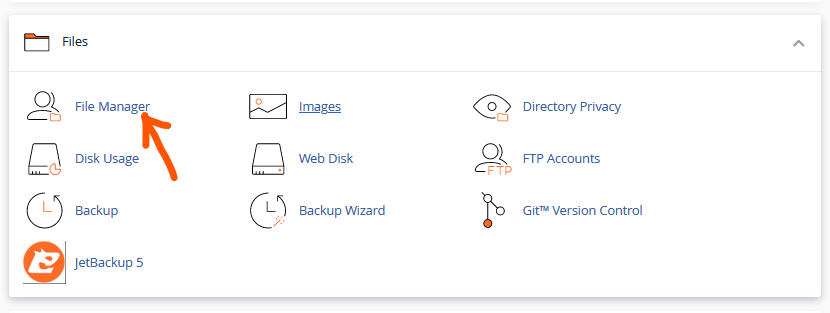
- Scroll down to the Files section and select File Manager.
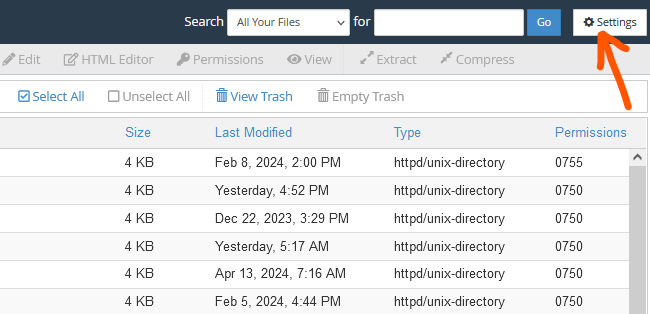
- In the File Manager, go to the far top-right corner and click Settings.
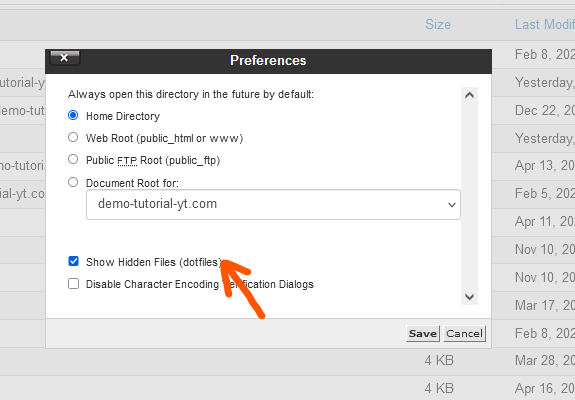
- Select the Document Root, check the Show Hidden Files box, and then Save.
In the tutorial above, I have shown you how to view hidden files in cPanel’s File Manager. If you have any questions or need assistance, you can leave your question in the comment section.